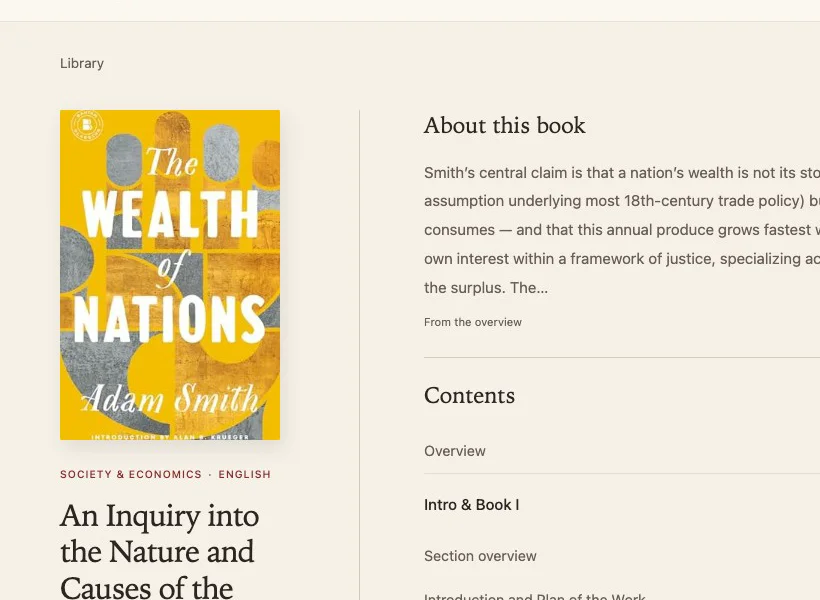
A private reading app for book summaries made from your own e-books. A pipeline of Claude Code agents reads each book chapter by chapter, and the reader brings saved places, audio and a Kindle mode.
The video uses The Wealth of Nations, a public-domain book, recorded locally on a copy of my library. The live app is private, behind sign-in.
The problem
Most of the books worth reading are long, and most of what I read sits in e-books I already own. A summary I can trust has to come from the book itself: its real chapters, its own examples and numbers, and nothing remembered from somewhere else. Generic summary services can't promise that, and they don't cover the books on my own shelf.
I was already making chapter-by-chapter summaries of my own books, but they lived as standalone web pages: hard to read on a Kindle, with no saved place and no way to see what I was halfway through.
How a book gets in
Everything starts from a file you own. Distill never summarizes from memory: if there's no e-book, the pipeline stops and asks for one.
- Get the real text. PDF, EPUB, or Kindle formats converted to EPUB with Calibre. The pipeline finds the real table of contents and the offset between printed and file page numbers, and checks it on a second chapter.
- Map the chapters. Every chapter in the book's own table of contents becomes its own chapter in Distill, and the book's own parts stay as they are. Each chapter's length is recorded, because it sets how long its summary should be.
- Read in parallel. The book is split into chunks of 80–150 pages, and one Claude Code agent reads each chunk in full and writes a summary for every chapter, ending with key points.
- Hold it to a rubric. Summary length scales with the chapter: 15% of its length, kept between 600 and 1,200 words in English, or 950 and 1,900 characters in Chinese. Summaries must give the chapter's actual claims and evidence, not "this chapter discusses". Figures from the book come along, and online images are opt-in, from sources like Wikimedia Commons. Finally a separate, fresh agent scores the whole book and checks it reads as one coherent whole.
- Import. One command on my computer writes the book into Distill's database. The server never runs a language model and never sees the e-book.
The summaries stay private: they're made from books I own, for my own reading, behind sign-in.
Reading
- Library. Search by title or author, filter by language and category, and see what's unread or finished.
- Book page. An overview, then the contents in the book's own parts, with Start and Listen.
- Reader. Page by page, with a choice of fonts, text size, and light or dark theme. Your place is saved and follows you across devices.
- Listen. Each chapter is recorded on my Mac ahead of time, in English or Mandarin. Listening starts where you are reading, and the paragraph being read stays highlighted.
- Kindle mode. A version for the Kindle's own web browser, with sign-in from your phone and full-screen reading controlled by the Kindle's own gestures.
How it's built
- One repo with Plainly. The reader, saved progress, Kindle mode and audio player are shared code; each app has its own database, service and deploy.
- Backend: Python, Flask and SQLite. Book content is stored as data, not as HTML pages.
- Summaries: the
book-summary Claude Code skill, run on my own computer with parallel agents.
- Audio: the Mac's own voices, rendered ahead of time with timings for each paragraph.
The hardest part
The Kindle. Its browser is an old version of WebKit: no modern JavaScript, and no WebP or AVIF images. The Kindle pages are rendered on the server with a small old-style script, images are stored as JPEG or PNG, the controls use the Kindle's own gestures, and the controls are 2.5 times larger than on a laptop so they're readable on e-ink.